---
# Synchronizing Red Hat Hardened Images Packages to Red Hat Satellite
**URL:** https://crunchtools.com/synchronizing-red-hat-hardened-images-packages-red-hat-satellite/
Date: 2026-09-01
Author: fatherlinux
Post Type: post
Summary: Sync Red Hat Hardened Images RPM packages to Red Hat Satellite with full GPG validation — ideal for building containers in disconnected environments.Continue Reading "Synchronizing Red Hat Hardened Images Packages to Red Hat Satellite" →
Categories: Articles
Tags: Container Images, Red Hat, RHEL, Security, Systems Administration
Featured Image: https://crunchtools.com/wp-content/uploads/2026/09/gemini_gen_20260901_141409_870e9f91.png
---
Many Red Hat Enterprise Linux (RHEL) and Red Hat Satellite customers are adopting Red Hat Hardened Images (RHHI), the productized, minimal container images built downstream from the upstream Fedora Hummingbird Linux project. Containers are Linux, so whenever you build a container you need access to the RPM Package Manager (RPM) packages that make up the operating system layer. Synchronizing the Red Hat Hardened Images packages into Satellite puts those packages behind the same content pipeline developers and architects already use, which is especially valuable in a disconnected environment where the build hosts cannot reach the internet.
This article walks through that configuration end to end using the `hammer` command line interface (CLI), with a short note on why each command is necessary.
Table of Contents
[Toggle](#)
- [The Upstream Repository](https://crunchtools.com/?p=6373/#The_Upstream_Repository)
- [Managing Keys](https://crunchtools.com/?p=6373/#Managing_Keys)
- [Create and Synchronize The Repository](https://crunchtools.com/?p=6373/#Create_and_synchronize_the_repository)
- [Publish and Promote](https://crunchtools.com/?p=6373/#Publish_and_promote)
- [Server Configuration](https://crunchtools.com/?p=6373/#Server_Configuration)
- [Client Configuration](https://crunchtools.com/?p=6373/#Client_configuration)
- [Keeping the repository synchronized](https://crunchtools.com/?p=6373/#Keeping_the_repository_synchronized)
## The Upstream Repository
The Red Hat Hardened Images RPM packages are published in a public repository that requires no subscription and no entitlement certificate. The path still carries the upstream Hummingbird name:
```
`https://packages.redhat.com/api/pulp-content/public-hummingbird/x86_64/`
```
Because it is public, you can synchronize it directly into Satellite as custom content without client certificates. It is also substantial. The synchronized repository holds roughly nineteen thousand packages, which is worth knowing before you choose a download policy.
## Managing Keys
When you pull software from a repository, there are two separate things you might want to prove: that each package is genuinely from Red Hat and untampered, and that the repository’s catalog of what it offers is itself trustworthy. Package signing in dnf and Satellite maps to exactly those two questions, controlled by two settings people constantly confuse.
- `gpgcheck` **trusts the packages.** It verifies the signature on every individual RPM before it installs, and because every Red Hat Hardened Images package is signed with the Red Hat release keys, this is the check you want enabled.
- `repo_gpgcheck` **trusts the list of packages.** It ensures nobody tampered with the catalog telling dnf what exists and which version is newest. Red Hat Hardened Images does not yet publish this file, so it should be left disabled (`repo_gpgcheck=0`). The risk is mitigated by image scanning to validate that all CVEs are patched.
Before configuring anything, it is worth confirming what Red Hat actually signs. Pull one package straight from the upstream repository and inspect it. `rpm -Kv` reports every signature individually, which `rpm -K` alone summarizes away.
```
dnf download \
--repofrompath=hb,"https://packages.redhat.com/api/pulp-content/public-hummingbird/x86_64/" \
--repo=hb --nogpgcheck bash
rpm -Kv ./bash-5.3.15-2.1.hum1.x86_64.rpm
```
On a RHEL 10.1 host running `rpm-4.19.1.1`:
```
./bash-5.3.15-2.1.hum1.x86_64.rpm:
Header V6 ML-DSA-87+Ed448/SHA512 Signature, key ID 05707a62: OK
Header V4 RSA/SHA256 Signature, key ID fd431d51: OK
Header SHA256 digest: OK
Header SHA1 digest: OK
Payload SHA256 digest: OK
MD5 digest: OK
```
These packages are dual-signed. The first line is a post-quantum signature, Module-Lattice-Based Digital Signature Algorithm (ML-DSA-87) combined with Ed448, carried in an RPM V6 signature header. The second is the long-standing Rivest-Shamir-Adleman (RSA) release key, `fd431d51`. Evaluating the post-quantum signature requires RHEL 9.7 or 10.1 and later, but because the RSA signature is present as well, older clients still have a signature to validate against. The `.hum1` release tag marks these as Hummingbird builds.
Now, let’s pull the keys into Satellite. It cannot reference a key file on disk. It stores keys as Content Credentials, and repositories point at those. The release keys ship at `/etc/pki/rpm-gpg/RPM-GPG-KEY-redhat-release`.
```
hammer content-credentials create \
--name "RPM-GPG-KEY-redhat-release" \
--content-type gpg_key \
--path /etc/pki/rpm-gpg/RPM-GPG-KEY-redhat-release \
--organization "Acme Org"
```
## Create and synchronize The Repository
In Satellite, repositories live inside Products. The Product is an organizational container, and you cannot create a custom repository without one.
```
hammer product create \
--name "Red Hat Hardened Images" \
--organization "Acme Org"
```
The repository must reference the Content Credential by numeric identifier, and that identifier differs on every Satellite. Look it up rather than hardcoding it.
```
GPG_ID=$(hammer --no-headers --csv content-credentials list \
--organization "Acme Org" \
--fields id,name | awk -F, '$2=="RPM-GPG-KEY-redhat-release"{print $1}')
```
This defines the repository itself, pointing Satellite at the upstream Uniform Resource Locator (URL) and attaching the signing key so per-package validation is enforced for clients.
```
hammer repository create \
--name "RHHI x86_64" \
--product "Red Hat Hardened Images" \
--content-type yum \
--url "https://packages.redhat.com/api/pulp-content/public-hummingbird/x86_64/" \
--gpg-key-id "$GPG_ID" \
--download-policy immediate \
--mirroring-policy additive \
--retain-package-versions-count 3 \
--organization "Acme Org"
```
I want to call attention to a few flags in particular:
- `--download-policy immediate` is the one that matters in a disconnected environment. Custom repositories default to `on_demand`, which synchronizes metadata only and fetches each RPM lazily on first client request. A build host with no route to the internet cannot make that request. `immediate` pulls the full package set at synchronization time, which is what you need before exporting to an air-gapped Satellite. With nearly nineteen thousand packages, plan for the disk and the wait.
- `--mirroring-policy additive` and `--retain-package-versions-count 3` work as a pair to keep the sync from hoarding every historical build. Current Satellite releases default a custom repository to the `Content Only` policy, which mirrors upstream exactly and rejects a retain count outright — set one without switching the policy and the create fails with `Retain package versions count cannot be set for repositories without 'Additive' mirroring policy`. The `additive` policy instead never removes a package once it has been pulled, so across repeated syncs an upstream that ships many versions of each package would grow without bound on disk and take longer to sync every time. Pairing `additive` with a retain count of three keeps the three newest versions of each package and prunes the rest, which trims the footprint and speeds up each resync. Thanks to Ben Breard for the tip. Set a count that leaves you enough rollback room for your change process.
- `--gpg-key-id` is what causes Satellite to write `gpgcheck=1` and the `gpgkey` line into the repository configuration it generates for clients. The client configuration later in this article is not hand-written; it follows from this assignment.
Creating the repository only records the definition. Synchronization is what actually pulls the packages into Satellite.
```
hammer repository synchronize \
--name "RHHI x86_64" \
--product "Red Hat Hardened Images" \
--organization "Acme Org"
```
Confirm the synchronization finished and the repository holds packages before going further. Publishing a Content View while a synchronization is still running produces an empty version, and every step after it appears to succeed while delivering nothing. This is the most common way to get a silently broken result. This command will also give you the Content Label for later.
```
hammer repository info \
--name "RHHI x86_64" \
--product "Red Hat Hardened Images" \
--organization "Acme Org"
```
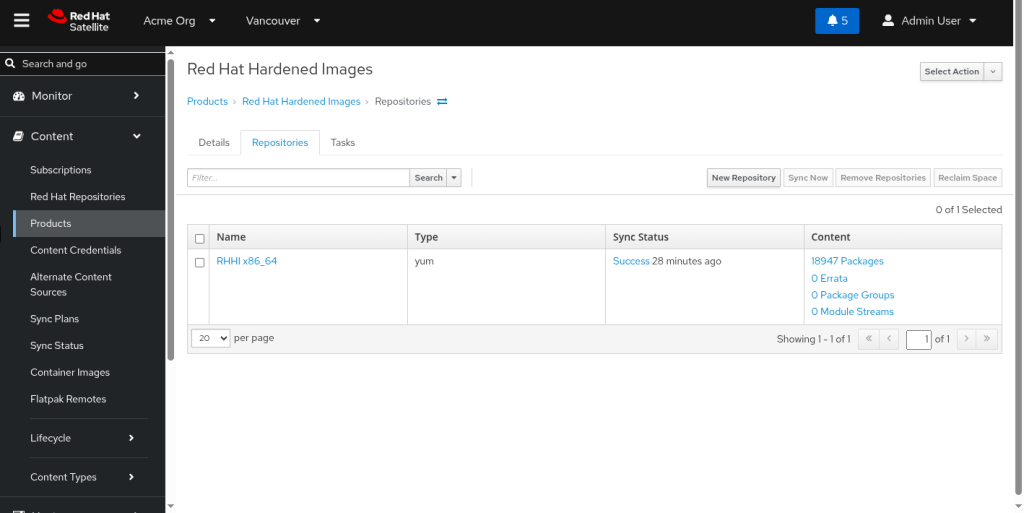
A completed synchronization reports content counts along these lines:
```
Sync State: Success
Content Counts:
Packages: 18947
Source RPMs: 0
Errata: 0
Package Groups: 0
Module Streams: 0
```
The zero errata count is expected. This repository does not carry errata metadata in its `repodata`, so Satellite’s errata subsystem will show nothing for it. Here’s what it will look like in the web interface:
## Publish and Promote
You must create a lifecycle environment to promote content.
```
hammer lifecycle-environment create \
--name "Dev" \
--prior "Library" \
--organization "Acme Org"
```
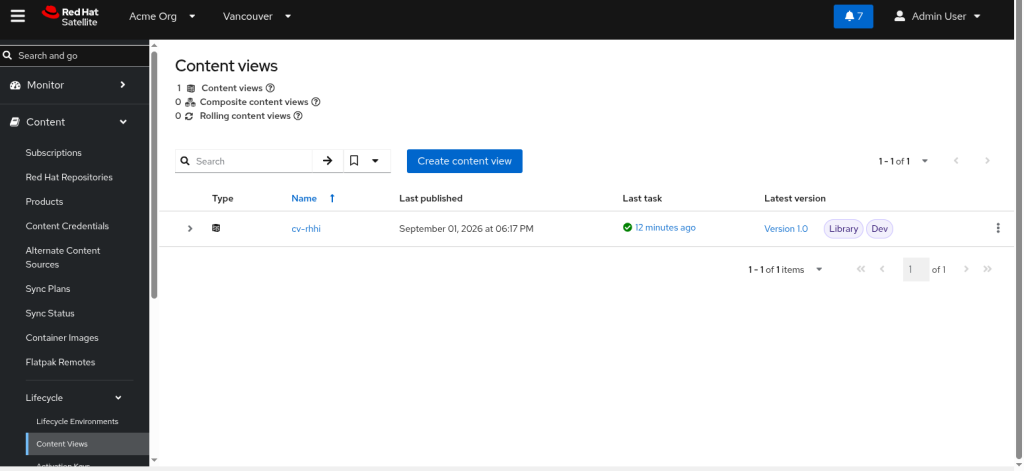
A Content View is the versioned, promotable snapshot of content that hosts actually consume. Creating it and adding the repository defines what the snapshot will contain.
```
hammer content-view create \
--name "cv-rhhi" \
--organization "Acme Org"
hammer content-view add-repository \
--name "cv-rhhi" \
--product "Red Hat Hardened Images" \
--repository "RHHI x86_64" \
--organization "Acme Org"
```
Publishing freezes the current repository contents into a numbered version. With `immediate` download policy and a package set this size, expect it to take a while.
```
hammer content-view publish \
--name "cv-rhhi" \
--organization "Acme Org"
```
Confirm which version number you produced. Assuming `1.0` works on a first publish and breaks on every one after.
```
hammer content-view version list \
--content-view "cv-rhhi" \
--organization "Acme Org"
```
A published version sits in `Library` until promoted. Hosts registered to `Dev` see nothing until this runs.
```
hammer content-view version promote \
--content-view "cv-rhhi" \
--version 1.0 \
--to-lifecycle-environment "Dev" \
--organization "Acme Org"
```
Container build systems are often not registered to Satellite at all. Marking the repository unprotected lets them consume it without entitlement certificates, which is reasonable here because the upstream content requires no subscription in the first place. Note that the flag is named `--publish-via-http` even though the concept is “unprotected”: setting it serves the repository over plain HTTP with no entitlement certificate required.
```
hammer repository update \
--name "RHHI x86_64" \
--product "Red Hat Hardened Images" \
--publish-via-http true \
--organization "Acme Org"
```
## Server Configuration
An activation key binds a host to the Content View and lifecycle environment holding the content, so registration is a single non-interactive step. The ordering is strict. The Content View must exist and have a version promoted into the environment first, or this fails with `Error: content_view not found`.
```
hammer activation-key create \
--name "ak-rhhi" \
--content-view "cv-rhhi" \
--lifecycle-environment "Dev" \
--organization "Acme Org"
```
Custom repositories can arrive disabled on the client. An override on the key enables the repository at registration time, using the `Content Label` captured earlier.
```
hammer activation-key content-override \
--name "ak-rhhi" \
--content-label "Acme_Org_Red_Hat_Hardened_Images_RHHI_x86_64" \
--value 1 \
--organization "Acme Org"
```
Note, Satellite can generate a registration command that handles the certificate authority, the activation key, and the token in one step, so you do not have to install a consumer RPM by hand first. The `--insecure true` flag matters here. The command Satellite hands back is a `curl` piped to `bash`, and that first `curl` reaches Satellite over HTTPS before the host trusts anything. In a disconnected or lab environment Satellite presents its own self-signed certificate authority, so without this flag the fetch dies with `curl: (60) SSL certificate problem: self-signed certificate in certificate chain` and nothing runs.
```
hammer host-registration generate-command \
--activation-keys "ak-rhhi" \
--insecure true \
--organization "Acme Org"
```
The above command will generate an all-in-one command to run on your clients. `--insecure true` only loosens that initial bootstrap fetch; the registration it kicks off still installs Satellite’s CA, and every `subscription-manager` and `dnf` transaction afterward is verified normally. If you would rather not skip verification even once, pull Satellite’s CA over plain HTTP and trust it on the client first, then drop the flag.
```
curl -o /etc/pki/ca-trust/source/anchors/katello-server-ca.crt \
http://satellite.example.com/pub/katello-server-ca.crt
update-ca-trust
```
## Client Configuration
You can run the all-in-one command generated by Satellite, or registration can be driven directly from the client. Note that `--org` takes the organization *label*, not the display name, and spaces become underscores. Confirm it rather than guessing at the transformation.
```
subscription-manager register \
--org="Acme_Org" \
--activationkey="ak-rhhi"
```
A successful registration looks like this:
```
Registering to: satellite.example.com:443/rhsm
The system has been registered with ID: 4f2b9c7e-1d3a-4c85-9f0e-7a6b2c1d8e40
The registered system name is: rhel1.example.com
```
Confirm the repository was actually delivered to the host. Use `--list` rather than `--list-enabled`, because a repository present but disabled is a different problem from one that never arrived, and only the full listing distinguishes them.
```
`subscription-manager repos`
```
```
+----------------------------------------------------------+
Available Repositories in /etc/yum.repos.d/redhat.repo
+----------------------------------------------------------+
Repo ID: Acme_Org_Red_Hat_Hardened_Images_RHHI_x86_64
Repo Name: RHHI x86_64
Repo URL: https://satellite.example.com/pulp/content/Acme_Org/Dev/cv-rhhi/custom/Red_Hat_Hardened_Images/RHHI_x86_64
Enabled: 1
```
Those hosts can then use a plain repository file. Take the `baseurl` from the `Published At` field of `hammer repository info` rather than assembling it by hand, because the path is built from organization, lifecycle environment, content view, and product *labels* rather than their display names:
```
[rhhi]
name=Red Hat Hardened Images
baseurl=https://satellite.example.com/pulp/content/Acme_Org/Dev/cv-rhhi/custom/Red_Hat_Hardened_Images/RHHI_x86_64
enabled=1
gpgcheck=1
gpgkey=file:///etc/pki/rpm-gpg/RPM-GPG-KEY-redhat-release
repo_gpgcheck=0
```
The end-to-end proof. Installing with signature checking left on exercises the whole chain at once: Satellite serving the content, the Content Credential validating the package, and the release keys on the client.
```
`dnf --disablerepo='*' --enablerepo='Acme_Org_Red_Hat_Hardened_Images_RHHI_x86_64' install bash`
```
## Keeping the repository synchronized
A sync plan resynchronizes the repository on a schedule instead of whenever somebody remembers. Attach it to the Product so it covers every repository the Product holds.
```
hammer sync-plan create \
--name "rhhi-daily" \
--interval daily \
--sync-date "2026-01-01 02:00:00" \
--enabled true \
--organization "Acme Org"
hammer product set-sync-plan \
--name "Red Hat Hardened Images" \
--sync-plan "rhhi-daily" \
--organization "Acme Org"
```
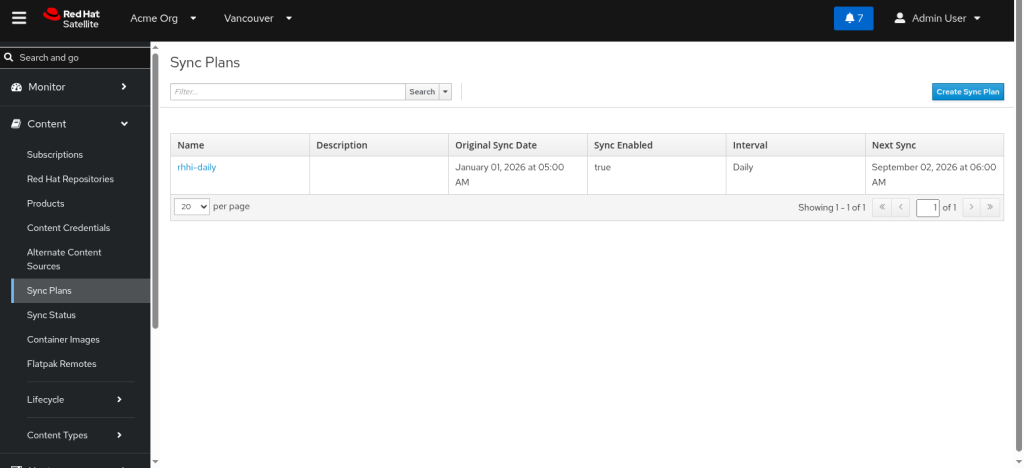
One step is missed more than any other here. **Synchronizing does not update your hosts.** A sync refreshes the `Library` environment only. Hosts registered to `Dev` continue to consume the Content View version that was promoted there, which is a frozen snapshot taken at publish time. New packages sit in Satellite, invisible to every client, until you publish a new version and promote it.
This is the recurring half of the workflow. Run it after each sync you intend to roll out, on whatever cadence your change process allows.
```
hammer content-view publish \
--name "cv-rhhi" \
--organization "Acme Org"
hammer content-view version list \
--content-view "cv-rhhi" \
--organization "Acme Org"
hammer content-view version promote \
--content-view "cv-rhhi" \
--version 2.0 \
--to-lifecycle-environment "Dev" \
--organization "Acme Org"
```
Verify the loop is actually running.
```
hammer repository info \
--name "RHHI x86_64" \
--product "Red Hat Hardened Images" \
--organization "Acme Org" | grep -E 'Sync State|Last Sync'
```
With the repository synchronized, published, and promoted on a schedule, developers and architects can install Red Hat Hardened Images packages through Satellite in connected and disconnected environments alike, with full per-package GPG validation against the Red Hat release keys.
---
## Categories
- Articles
---
## Navigation
- [Home](https://crunchtools.com/)
- [Articles](https://crunchtools.com/category/articles/)
- [Events](https://crunchtools.com/category/events/)
- [News](https://crunchtools.com/category/news/)
- [Presentations](https://crunchtools.com/category/presentations/)
- [Software](https://crunchtools.com/software/)
- [Beaver Backup](https://crunchtools.com/software/beaver-backup/)
- [Check BGP Neighbors](https://crunchtools.com/software/check-bgp-neighbors-nagios/)
- [Chev](https://crunchtools.com/software/chev-check-vulnerabilities-script/)
- [Graph BGP Neighbors](https://crunchtools.com/software/grpah-bgp-neighbors/)
- [Graph MySQL Stats](https://crunchtools.com/software/graph-mysql-stats/)
- [Graph Sockets Pipes Files](https://crunchtools.com/software/graph-sockets-pipes-files/)
- [MCP Servers](https://crunchtools.com/software/mcp-servers/)
- [Petit](https://crunchtools.com/software/petit/)
- [Racecar](https://crunchtools.com/software/racecar/)
- [Shiva](https://crunchtools.com/software/shiva/)
- [Trentina](https://crunchtools.com/software/trentina/)
- [About](https://crunchtools.com/about/)
- [Home](https://crunchtools.com)
## Tags
- Container Images
- Red Hat
- RHEL
- Security
- Systems Administration