Background
Recently, I set up vsftpd on RHEL5 with SSL and it was significantly easier than I had suspected it would be. I wanted to quickly share the methods I used to set up the server, test from a client, and verfiy everything was encrypted.
I chose FTPS (FTP over SSL) with vsftpd as opposed to SFTP (over SSH) for several reasons. First, I chose vsftpd because of the limits which are placed on the FTP shell. Using vsftpd also allows us to use the same service for people who have older clients that can’t use ssl. Finally, vsftpd provides handing of the umask in a way that is conducive to teams working in the same directory.
FTPS and FTPES
The next point of confusion is often Implicit FTPS vs explicit FTPS. . In writing both are referred to simply as FTPS which can be very confusing. Worse, some FTPS clients can do one and not the other. This article will discuss FTPES because it is generally used along side regular FTP with vsftpd.
Explicit FTPS was developed to run on the same port as regular FTP. Explicit FTPS allows the password, the data, or both to be encrypted. Each is optional and it is negotiated by the client and server upon connection. Implicit FTPS is completely different. Implicit FTPS works similar to HTTPS because it is run on a different port and the entire connection is encrypted. In some clients FTPS refers to implicit, while FTPES refers to explicit. Also, when using FTPES, be careful to encrypt both the password and the data.
Pitfalls
I have used vsftpd for several years with regular ftp and even anonymous ftp but never with ssl. When using software in a new use case, it is critical to verify the behavior, especially when dealing with something like sensitive data over ssl.
When I first set up Vsftpd and connected with Lftp, I noticed that it reported some clues that it was connecting over SSL, but this was not enough. I verified the encrypted/unencrypted traffic with wireshark and now I am confident the software is behaving the way I want it to.
Normally, I would have used tcpdump, which I am more comfortable with, but I didn’t want to save the pcap file with the right snap length, etc, etc. It was easier to do deep packet inspection in one shot with Wireshark, but it can be uncomfortable to use a piece of software like this when it has been 3 months since the last use.
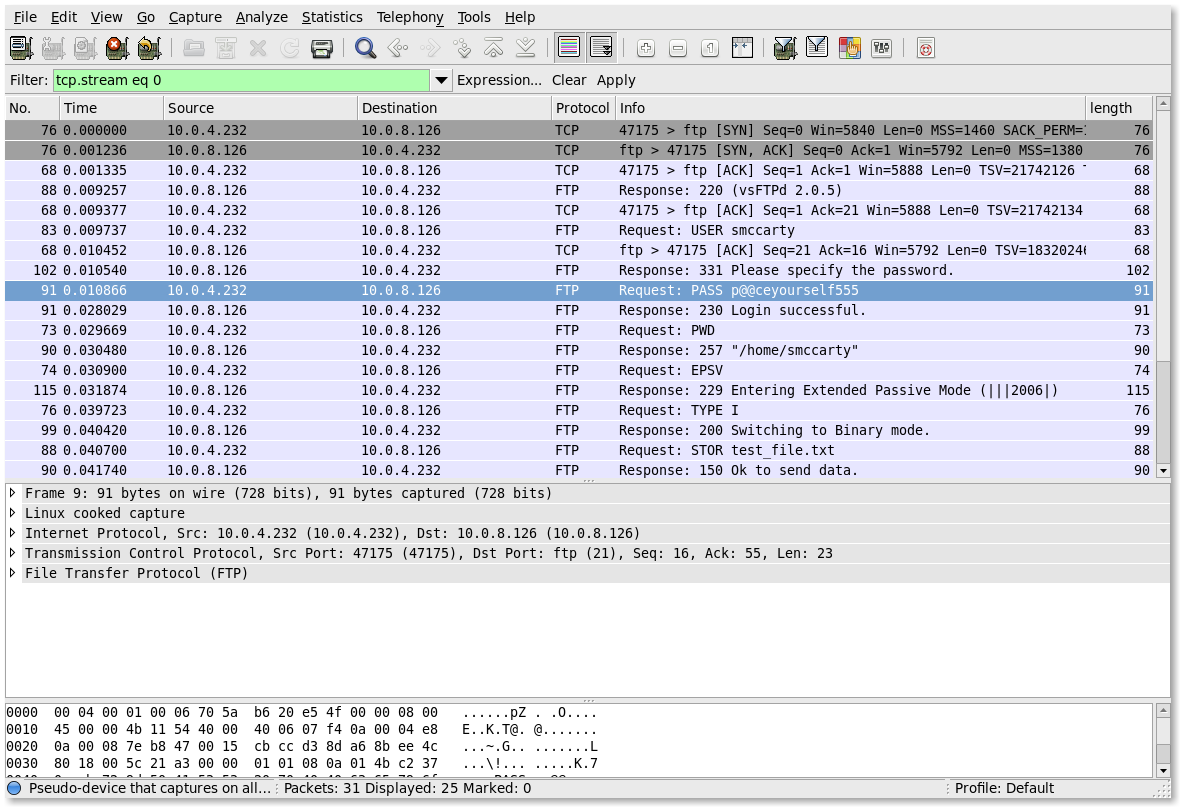
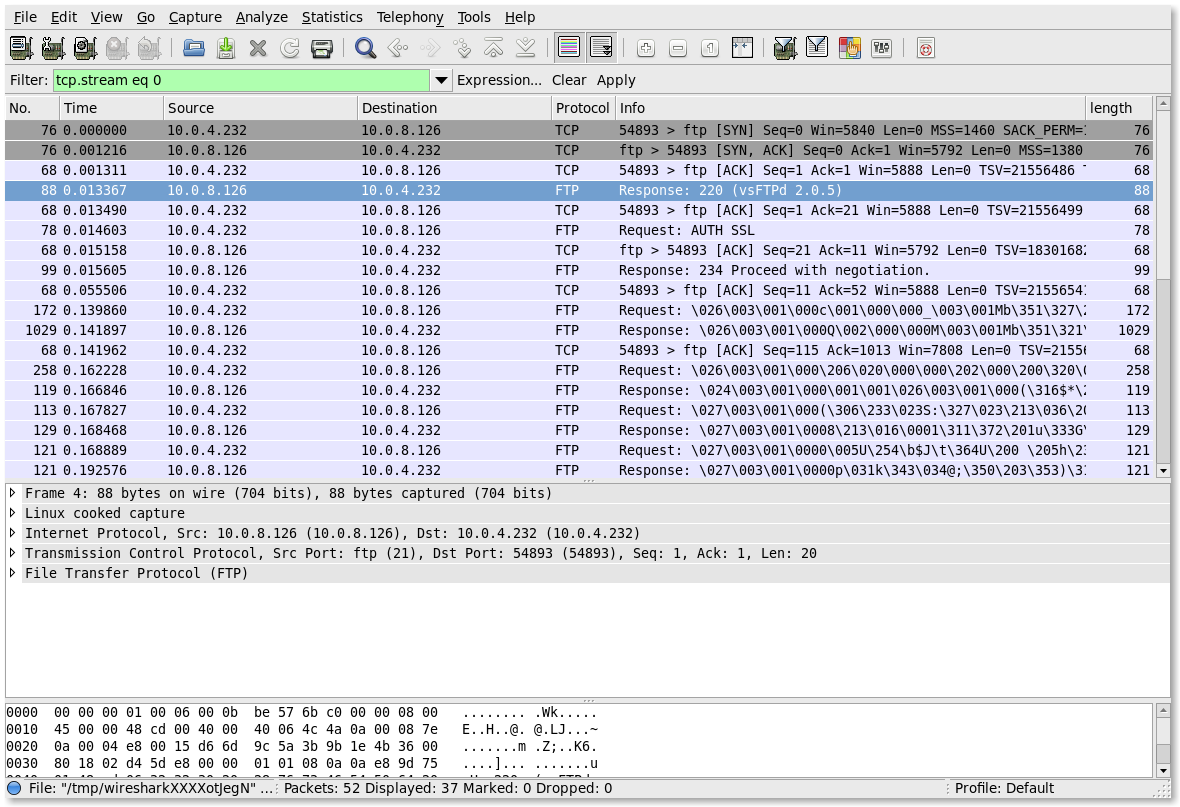
Verification also takes a bit of reasoning and patience. For example, I couldn’t remember what FTP traffic looks like, it has been several years since the last time I did any kind of inspection. I gained confidence, by first looking at the unencrypted traffic. When I was comfortable that I understood it well enough, I verified that the encrypted traffic really was unreadable. I had confidence, because I looked at the unencrypted traffic first.
Basics
Server Configuration
The general process is, generate SSL certificate, then configure vsftpd to use it. The following commands will generate a key and certificate that will be valid for one year. There are only a couple of commands that really have to be in the configuration file to make SSL work.
Generate SSL Certificate
openssl req -x509 -nodes -days 365 -newkey rsa:1024 -keyout /etc/vsftpd/vsftpd.pem -out /etc/vsftpd/vsftpd.pem
Basic Vsftpd Configuration
vim /etc/vsftpd/vsftpd.conf
ssl_enable=YES

rsa_cert_file=/etc/vsftpd/vsftpd.pem

rsa_private_key_file=/etc/vsftpd/vsftpd.pem
Vsftpd Configuration: Force Encryption for passwords and data
force_local_data_ssl=YES

force_local_logins_ssl=YES
Curl Syntax
List files
curl --ftp-ssl --insecure --user smccarty:p@@ceyourself555 ftp://ftp.eyemg.com
Upload a file
curl --ftp-ssl --insecure --user smccarty:p@@ceyourself555 -T test_file.txt ftp://ftp.eyemg.com
Download a file
curl --ftp-ssl --insecure --user smccarty:p@@ceyourself555 ftp://ftp.eyemg.com/test_file.txt
Delete a file
curl --ftp-ssl --insecure --user smccarty:p@@ceyourself555 -X "DELE test_file.txt" ftp://ftp.eyemg.com
Lftp Syntax
Connect to the server, enable SSL, and authenticate
lftp

lftp :~> set ssl-force true

lftp :~> set ssl-protect-data true

lftp :~> connect ftp.eyemg.com

lftp :~> login smccarty

Password:
Now run ftp commands as normal
lftp [email protected]:~> ls

-rw-rw-r--    1 607      503             0 Feb 21 17:43 test_file.txt
Experiment
Wireshark
Capture command. Since I am using ssh to connect to the box, I want to exclude that traffic.
wireshark -f "host ftp.eyemg.com and port not 22"
Unencrypted
Un-encrypted command
curl --ftp-ssl --insecure --user smccarty:p@@ceyourself555 -T test_file.txt ftp://ftp.eyemg.com
Un-encrypted screenshot
Encrypted
Encrypted command
curl --ftp-ssl --insecure --user smccarty:p@@ceyourself555 -T test_file.txt ftp://ftp.eyemg.com
Encrypted Screenshot
Conclusion
At times, I feel myself being resistant to the verification process because the tool I need to use is unfamiliar. I have found two things help with this pain. First, familiarity; even if it has been a year since I last used a tool, the familiarity comes back quickly. Second, just do it; the pain never ends up being as bad as I anticipated. It is critical to get over this pain if we are to deliver better service and these scientific methods are invaluable for the edge.
You got the definition of explicit vs implicit backwards there.
Explicit runs on the normal ftp port 21.
Implicit runs on a different port 990 a-la https.
Implicit:
The clients desire for ssl is implicit in the fact that it connected to port 990.
Explicit:
When a client connects to the normal ftp port 21, then the server has to assume until told otherwise, that the client wants a normal ftp session. If the client wants ssl, it has to explicitly request it via a command, and then the server and client negotiate the ssl handshake and switch from plain text to ssl.
Brian,
Thank you for the extra clarification. I did not have it backwards per se, there was actually a typo and this type made it very confusing. My apologies especially since I wrote this article to help clarify the differences. I have corrected the fourth paragraph.
Incorrect
Explicit FTPS was developed to run on the same port as regular FTP. Explicit FTPS allows the password, the data, or both to be encrypted. Each is optional and it is negotiated by the client and server upon connection. Implicit FTPS is completely different. Explicit FTPS works similar to HTTPS because it is run on a different port and the entire connection is encrypted. In some clients FTPS refers to implicit, while FTPES refers to explicit. Also, when using FTPES, be careful to encrypt both the password and the data.
Corrected Version
Explicit FTPS was developed to run on the same port as regular FTP. Explicit FTPS allows the password, the data, or both to be encrypted. Each is optional and it is negotiated by the client and server upon connection. Implicit FTPS is completely different. Implicit FTPS works similar to HTTPS because it is run on a different port and the entire connection is encrypted. In some clients FTPS refers to implicit, while FTPES refers to explicit. Also, when using FTPES, be careful to encrypt both the password and the data.