---
# Chev
**URL:** https://crunchtools.com/software/chev-check-vulnerabilities-script/
Date: 2010-05-02
Author: kuroda
Post Type: page
Summary: Download Version 2.0: Change Log Chev is python based and works on many platforms Redhat/Fedora Debian/Ubuntu Cygwin/Unix Background Chev (Check Vulnerabilities Script) was designed to help track security vulnerabilities which are published by many Computer Emergency Response Teams (CERT) in the form of RSS feeds. It works as a stand alone script, ran fromContinue Reading "Chev" →
Featured Image: https://crunchtools.com/wp-content/uploads/2010/04/Chev_Screenshot1.jpeg
---
[](http://crunchtools.com/files/2010/04/Chev_Screenshot1.jpeg)
[toc]
## Download
Version 2.0: [Change Log](http://code.google.com/p/crunchtools/source/list)
Chev is python based and works on many platforms
### [Redhat/Fedora](http://crunchtools.com/wp-content/files/chev/chev-current.rpm)
### [Debian/Ubuntu](http://crunchtools.com/wp-content/files/chev/chev-current.deb)
### [Cygwin/Unix](http://crunchtools.com/wp-content/files/chev/chev-current.tgz)
## Background
Chev (Check Vulnerabilities Script) was designed to help track security vulnerabilities which are published by many Computer Emergency Response Teams (CERT) in the form of RSS feeds. It works as a stand alone script, ran from cron, or with Nagios. It is very easy to use, just add the names of the software you want to track and it will work out of the box.
## Architecture
- Follows sane by default architecture
- Scrapes several standard RSS feeds
- Designed to work standalone or with Nagios
Checks the results against two lists of software
- Critical software will send a page when a vulnerability is found (Nagios)
- Warning software will bring up an interface error when a vulnerability is found (Nagios)
Works with syslog
- Leaves audit trail
- Works on remote systems
- Built using crunchtools
## Routine Operations
### Check Vulnerabilities
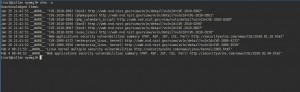
Check for new security vulnerabilities. Very simple, just run it and it will check each rss feed and each piece of software.
`chev`
Example Output
Sep 9 16:13:51 __WARN__ WordPress 2.8.4: Security Release http://wordpress.org/development/2009/08/2-8-4-security-release/
Sep 9 16:13:51 __WARN__ WordPress 2.8.3 Security Release http://wordpress.org/development/2009/08/wordpress-2-8-3-security-release/
Sep 9 17:06:03 __WARN__ Web applications security vulnerabilities summary (PHP, ASP, JSP, CGI, Perl) http://securityvulns.com/news/CGI/2009.09.09.html
### Acknowledge All
Acknowledge all items in the list and sort through them in a file. It is often easier to pipe output to a file and manipulate it there, than to acknowledge each entry individually.
`chev -a >> file.txt`
### Acknowledge Individual
Acknowledge individual entries. Specify the string of the entry after the acknowledge option.
`chev -a WordPress 2.8.4: Security Release http://wordpress.org/development/2009/08/2-8-4-security-release/`
### Add New Software
Add new software to check. Warn is used to bring up an interface error while Crit is used to page in Nagios. If Chev is being used without Nagios, either list can be used.
`vim /usr/local/chev/etc/warn.conf`
`vim /usr/local/chev/etc/crit.conf`
## Special Operations
### Add Feeds
This file uses the simple format of one per line
`vim /usr/local/chev/etc/feeds.conf`
### Separate Log Files
Syslog-ng can be used to route to certain files based on patterns, it is useful to split chev entries to a separate log in high volume environments. When your system is configured this way, it is necessary to configure Chev to understand what log to use. It uses /var/log/messages by default.
`vim /usr/local/chev/etc/chev.conf`
`file="/var/log/custom"`
### Add to Nagios
Example Command Definiition
define command{
command_name chev
command_line $USER1$/chev -f /var/log/chev.log
}
Example Service Definitiion
define service{
use local-service
host_name localhost
service_description Check Vulnerabilities Log
check_command chev
}
---
## Navigation
- [Home](https://crunchtools.com/)
- [Articles](https://crunchtools.com/category/articles/)
- [Events](https://crunchtools.com/category/events/)
- [News](https://crunchtools.com/category/news/)
- [Presentations](https://crunchtools.com/category/presentations/)
- [Software](https://crunchtools.com/software/)
- [Beaver Backup](https://crunchtools.com/software/beaver-backup/)
- [Check BGP Neighbors](https://crunchtools.com/software/check-bgp-neighbors-nagios/)
- [Chev](https://crunchtools.com/software/chev-check-vulnerabilities-script/)
- [Graph BGP Neighbors](https://crunchtools.com/software/grpah-bgp-neighbors/)
- [Graph MySQL Stats](https://crunchtools.com/software/graph-mysql-stats/)
- [Graph Sockets Pipes Files](https://crunchtools.com/software/graph-sockets-pipes-files/)
- [MCP Servers](https://crunchtools.com/software/mcp-servers/)
- [Petit](https://crunchtools.com/software/petit/)
- [Racecar](https://crunchtools.com/software/racecar/)
- [Shiva](https://crunchtools.com/software/shiva/)
- [Trentina](https://crunchtools.com/software/trentina/)
- [About](https://crunchtools.com/about/)
- [Home](https://crunchtools.com)